General Information
Hosted Checkout service offers a quick and convenient solution for creating a secure payment page, facilitating the collection, submission, and processing of payments.
To enable the Checkout service on your website, integration is required. The Checkout integration provides a range of APIs that enable businesses to customize their payment processing. These APIs facilitate the acquisition of payments (purchases) through specific interactions with merchant websites.
The API expects request data in the form of JSON string and responds with JSON string data as well.
The Checkout service collects information about the customer's browser during their interaction.
While the customer is on the Checkout page, the service retrieves data regarding their operating system, browser, and browser language. In certain situations, this information is transmitted to the acquirer.
Checkout Process Flow
Checkout payment flow is shown below.
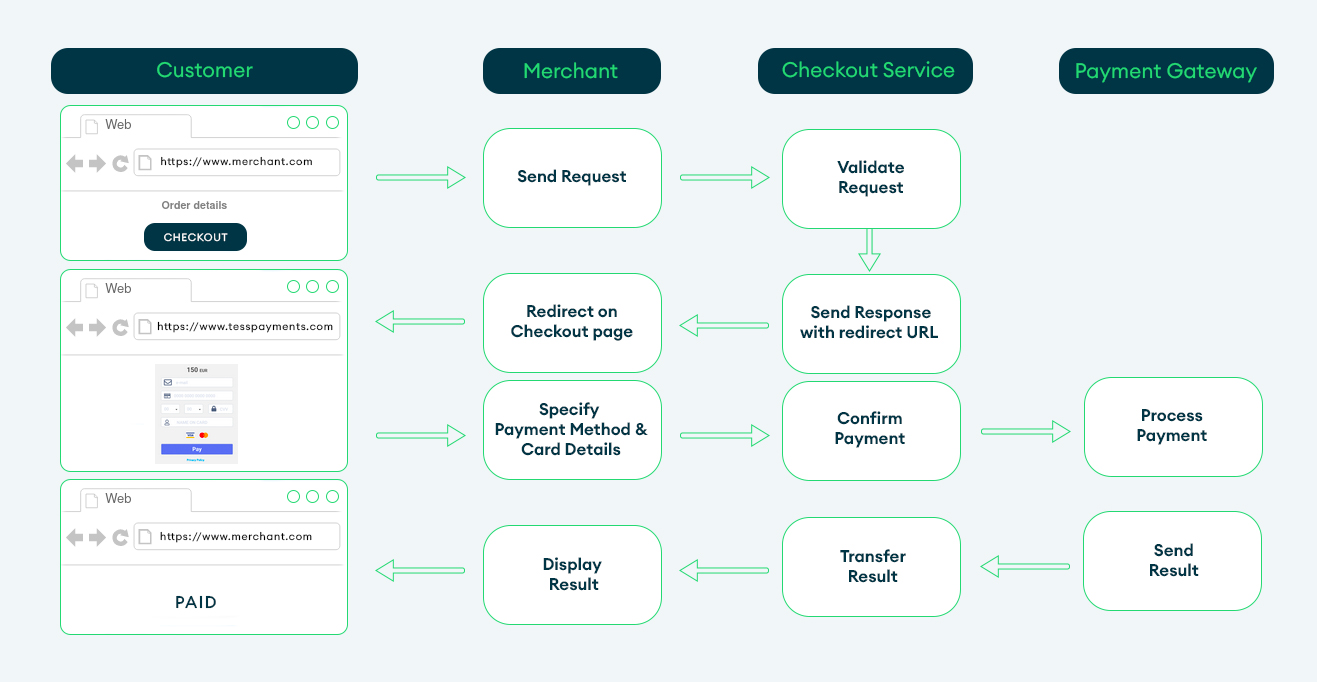
When a Customer wants to make a purchase on your site the following happens:
- Customer places an order and initiates payment on the site.
- Site confirms the order and sends the payment processing request to the Checkout system with information about the order, payment and hash.
- Checkout system validates the request and sends to the site the response with the redirect link.
- The site redirects the Customer on the Checkout page by redirect link.
- Customer selects the payment method, enters the payment data and confirms the payment. The payment method will be specifying automatically If only one method is available.
- The payment processes at Payment Gateway.
- Payment Gateway sends a callback to the site with the payment result.
- The payment result is shown to the Customer.
The payment could be declined in case of invalid data detection.
Checkout Page Description
Checkout page is shown to the Customer after a payment initiation. There are the fields to enter the payment data.
Definitions
In the Hosted Checkout section, please replace "{{CHECKOUT_HOST}}" with the provided URL in each API sample.
Fields Validation
The fields displayed on the Checkout page are dependent on the request parameters and the selected payment method.
If the acquirer does not require certain information, those fields will not be visible to customers. For instance, if an alternative payment method is chosen, the card data will not be displayed on the Checkout page.
Conditional fields, such as email or billing address, should be noted. If the email and billing address parameters are included in the request, they will not be shown on the Checkout page.
Additional fields may appear if a payment method is selected that requires additional customer data.
The Checkout page includes field validation. In case of invalid data, an error message will be displayed and the respective field will be highlighted.
Below is a list of the general fields and possible errors that can be encountered on the Checkout page.
| Fields | Type | Limitations | Error |
|---|---|---|---|
Card number | Integral | Lun algorithm, length 14-19 numbers | Invalid card number |
Expirу Date | Date | 2-2 numbers (in the format mm-yy), after today's date | The expiration date of card is expired and not valid. |
Security code | Integral | Up to 4 characters | Invalid security code |
Name on card | String | Up to 22 characters (min - 2 characters) | The name on card field must have at least 2 characters |
Country | List | 2-letters code | Country is required. Please enter a valid Country |
State/Region | String List - for USA, Canada, Australia, Japan, India | ||
City | String | Up to 32 characters | City is required. Please enter a valid City |
Address line | String | Up to 32 characters | Address line is required. Please enter a valid Address line |
Zip code | String | Up to 32 characters | Zip code is required. Please enter a valid Zip code |
Phone number | String | Up to 32 characters | Phone number is required. Please enter a valid Phone number |
Pre-Routing
To enhance the convenience of selecting a payment method for customers, pre-routing can be implemented on the Checkout page.
This feature enables you to establish matches through the Custom routing module in the admin panel, determining the appropriate list of payment methods based on the current payment scenario.
By utilizing this functionality, you can prevent customers from selecting payment methods that are not available in their region, thereby increasing the likelihood of successful payments and reducing the risk of declined transactions.
Please note that if the Authentication request includes a list of payment methods in the methods array, the pre-routing configurations will not be taken into account.
Tokenization
For regular customers, we have made the payment page even more convenient and simple.
You can save the customer's card data so that they can reuse it for future payments.
3DS Tokens
To do this, you need to send the req_token = true parameter in the Authentication request. And then, in the callback, you will receive a card token.
Use the token when sending the next Authentication request and your client will see anonymized card details on the payment form, which will greatly simplify the payment process.
Recurring
To do this, you need to send the recurring_init = true parameter in the Authentication request. And then, in the callback, you will receive a recurring_token and recurring_init_trans_id.
Use the recurring_token and recurring_init_trans_id when sending the Recurring request for payment process without intervention of the customer.
Subscription
To do this, you need to send the recurring_init = true and schedule_id parameters in the Authentication request. And then, in the callback, you will receive a recurring_token, recurring_init_trans_id and schedule_id.
Use the recurring_token, recurring_init_trans_id and schedule_id when sending the Recurring request for payment process without intervention of the customer.
To customize checkout page, please follow instructions here.